.svg)


Say Goodbye to the Transportation Data Scavenger Hunt in Your TMS

Key Takeaways

- Stop digging and start executing by asking the AI assistant plain-language questions to instantly retrieve real-time shipment, carrier, and invoice data all in one place.
- Eliminate daily administrative drag with a deeply connected AI that unifies fragmented logistics context in a single conversational window.
- Make faster decisions safely using a secure, read-only assistant that provides instant visibility across your entire network without the risk of altering live operational data.
Finding a missing proof of delivery shouldn't require a digital scavenger hunt.
Outdated transportation management systems (TMS) display tracking charts but tend to ignore administrative labor. Shippers don't want to lose hours clicking through 15 different menus repeatedly, and neither do planners facing non-stop questions about shipment locations, late tenders, and pending invoices.
That’s why Shipwell expanded the reach of our In-App AI Assistant, known as Swifty, by connecting it to the Shipwell MCP Server. Users can ask questions in plain language and get answers from across their entire transportation data set, Shipwell’s Help Center content, and platform workflows.
What is the Shipwell MCP Server?
The Shipwell MCP Server is a secure connection layer that gives AI tools structured access to transportation data, workflows, and platform knowledge inside Shipwell. MCP stands for Model Context Protocol. In simple terms, it gives AI assistants a safer, more standardized way to connect with business systems and retrieve relevant context.
The result is a more useful AI experience inside the TMS. It brings AI closer to the actual work happening inside transportation operations – not as a separate tool, but as an intelligent layer connected to the systems, data, and workflows teams already use every day.
By eliminating navigational friction, your team can focus purely on strategy and relationship building. Here’s how Shipwell’s updated In-App Assistant uses our secure MCP server to unify your transportation data.
A More Natural Way to Work Inside Your TMS
Shipwell’s In-App AI Assistant gives users a conversational way to search, understand, and act on transportation information without manually navigating through every workflow.
Traditional transportation management systems are built around screens, menus, filters, and reports. That structure works when users know exactly what they are looking for and where to find it. But logistics work rarely moves in a straight line.
With the Shipwell MCP Server connection, the assistant can interpret the question, retrieve relevant information, and explain the answer in plain language. It can look across the following within the platform, to return useful answers faster across:
- Address Book Entries & Saved Locations
- Contracts & Carrier Records
- Invoices
- Orders
- Reporting Data
- Routing Guides and Appointments
- Shipments
- Shipwell Help Center
- Tenders
For shippers, that means less time searching and more time solving.
What Shipwell’s In-App AI Assistant Can Help With
The assistant can answer operational, financial, reporting, and platform questions using live transportation data and trusted Shipwell knowledge sources, to support the day-to-day questions logistics teams ask most often.
Address Book and Saved Locations
The assistant can search saved locations and address book entries so users can find location details faster.
Address data is foundational to transportation execution. The assistant can search saved locations and address book entries, helping users quickly find the right facility, customer, or shipping location.
Users can ask:
- “Find the address for this facility.”
- “Show me saved locations in Dallas.”
- “Which locations are tied to this account?”
This helps reduce manual lookup time and improves consistency when teams need accurate location information.
Carriers and Contracts
The assistant can help teams understand carrier relationships, assignments, contract rates, and lane details faster.
Transportation teams often need quick answers about which carrier is assigned, what rate applies, or how a carrier is connected to a lane or shipment. The assistant can look up carrier relationships, assignments, contract rates, and lanes directly from Shipwell.
Users can ask questions like:
- “Which carrier is assigned to this shipment?”
- “What contract rate applies to this lane?”
- “Which carriers do we have contracts with for this lane?”
This helps teams reduce back-and-forth and make faster decisions when managing freight execution.
Invoices
The assistant can help users find freight invoices and understand where they are in the approval process.
Freight invoice questions often slow teams down because the answer may sit between operations, finance, and carrier documentation. Shipwell’s AI Assistant can look up invoices and provide visibility into where they are in the approval process.
Users can ask:
- “Which invoices are waiting for approval?”
- “Show me invoices tied to this shipment.”
- “Why is this invoice still pending?”
That helps finance and operations teams resolve issues faster and reduce the manual effort tied to freight audit and settlement workflows.
Orders
The assistant can help users search for purchase orders, check order status, and review line-item details.
For teams managing transportation from order through delivery, order visibility is critical. The assistant can help users find purchase orders, understand order status, and review line items without manually searching through order screens.
Users can ask:
- “What is the status of this purchase order?”
- “Show me the line items on this order.”
- “Which orders are tied to this shipment?”
That gives logistics teams a faster way to connect order context to transportation execution.
Reporting Data
The assistant can help users request custom reports from Shipwell’s data warehouse, including shipment volumes, carrier performance, invoice summaries, and other operational insights.
Reporting is one of the most valuable parts of a transportation management system, but it can also become a bottleneck when teams need custom views or ad hoc answers. Users can ask Shipwell’s AI Assistant for reports related to shipment volume, carrier performance, invoice summaries, and more.
Examples include:
- “Show me shipment volume by carrier for last month.”
- “Create a report of shipments by mode and region.”
- “Show me tender acceptance trends.”
This gives transportation teams a faster way to get operational insight without waiting on a custom report request or manually stitching together data.
Routing Guides and Appointments
The assistant can help users understand routing guide policies, facility appointments, dock schedules, and hours.
Routing guides and appointment details are critical to keeping freight moving, but the information can be hard to find when teams are under pressure. The assistant can look up routing guide policies, facility dock appointments, appointment status, and facility hours.
Users can ask:
- “What routing guide applies to this shipment?”
- “What are the dock hours for this location?”
- “Show me upcoming appointments for this facility.”
That makes it easier for teams to confirm the rules, timing, and facility details that shape execution.
Shipments
Users can find, summarize, and understand shipment activity without manually opening multiple shipment records.
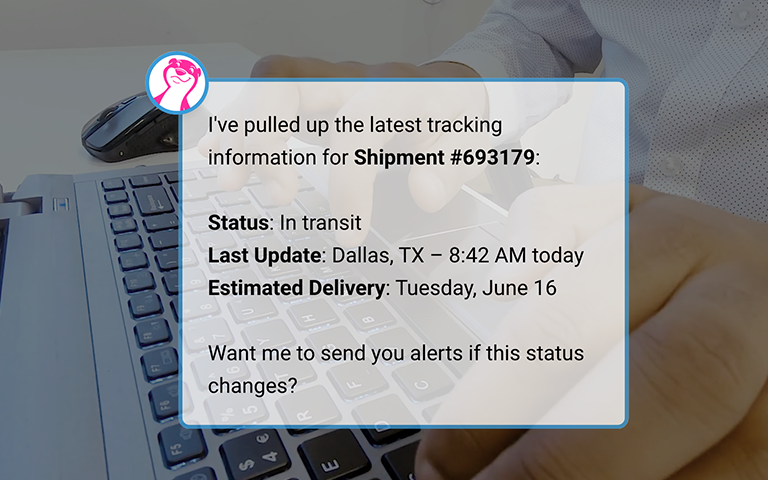
The assistant can help users search for shipments, check shipment status, review tracking details, pull ETAs, and surface related notes, messages, and documents such as bills of lading and proofs of delivery.
For example, a user could ask:
- “Where is shipment 12345?”
- “Summarize the latest updates on my delayed shipments.”
- “Show me shipments with missing PODs.”
Instead of clicking through shipment records, notes, messages, and documents, users can get a clearer answer in one place.
Shipwell Help Center
The assistant can answer how-to questions using Shipwell Help Center content and platform knowledge, making it easier for users to learn and troubleshoot.
The assistant can provide step-by-step guidance on Shipwell features by pulling from the Shipwell Help Center. Users can ask questions like:
- “How do I create a shipment?”
- “How do I upload a POD?”
- “How do I use dock scheduling?”
Instead of searching documentation or waiting for someone else to explain the process, users can get step-by-step how-to guidance directly inside the platform.
The assistant can also explain how parts of the platform work, including workflows, feature behavior, and where users should go to complete specific tasks. That makes it especially useful for onboarding new users, supporting occasional users, and helping experienced teams move faster.
Tenders
The assistant can help users quickly check whether a tender is pending, accepted, or rejected.
Tender status is one of the most common execution questions in freight operations. Instead of navigating into a tender record, users can ask the assistant for the current status.
Example questions include:
- “Which tenders are still pending?”
- “Was this tender rejected?”
- “Show me the latest tender status for this load.”
This gives teams a faster way to identify freight that needs attention before it becomes an exception.
Built for Technical and Support Teams
The assistant can also help technical users and support teams understand how Shipwell features work, including system behavior, feature boundaries, and workflow logic.
For technical users, support teams, and internal administrators, the assistant can provide deeper explanations of how parts of the Shipwell platform work. That can be useful when teams need to understand why a feature behaves a certain way, what a workflow is designed to support, or where a process starts and stops.
For shippers, this creates a more transparent experience. Instead of relying only on institutional knowledge or manual investigation, teams can get clearer explanations grounded in the way the platform actually works.
Read-Only by Design
Shipwell’s In-App AI Assistant can look up information and explain what it finds, but it does not create, update, or delete records.
AI in logistics should make work easier without introducing unnecessary risk. That is why the assistant is read-only. It can search, summarize, explain, and report on information, but it does not take actions that change data in your Shipwell account.
This gives users a safer way to interact with operational data while keeping control over execution workflows where it belongs. The assistant also respects the permissions of the person using it. Users can only access information they are already allowed to see inside Shipwell.
Why This Matters for Shippers
By bridging conversational AI with the Shipwell MCP Server, logistics teams eliminate the repetitive friction that bogs operations down.
Inefficiency builds up quietly:
- Manual lookups create daily drag.
- Status questions distract coordinators from high-value tasks.
- Report requests delay critical decisions.
- Onboarding stalls as new hires hunt for where data lives.
The MCP Server breaks this cycle by giving the AI assistant structured access to deep transportation context. Instead of forcing users to navigate disconnected screens, filters, and reports, it interprets plain-language queries and instantly unifies fragmented data—from shipment status and carrier history to appointment details and invoices.
That is the difference between an AI that merely sits beside your TMS, and one that is deeply connected to how your operations actually run.
Shifting Toward More Intelligent Transportation Management
Shipwell’s AI Assistant is part of a broader shift toward transportation systems that help teams monitor, understand, and execute work with greater speed and confidence.
This integration represents a broader evolution in logistics. Transportation management is moving past static workflows, manual searching, and disconnected reporting. The next generation of TMS technology is conversational, contextual, and embedded directly into daily operations.
This update delivers that future today. Equipped with live account data, platform guidance, and read-only safeguards, the assistant gives shippers a secure, unified way to instantly understand exactly what is happening across their entire network.
Ask Shipwell. Get Answers.
Logistics teams don’t need more places to look, they need faster ways to know what requires attention.
With Shipwell’s expanded In-App AI Assistant, users can ask questions naturally and receive instant answers grounded in their real-time data, documentation, and reporting environment.
For shippers, that means less time digging and more time executing. They just need to ask.
Frequently Asked Questions
What is Shipwell’s in-app AI Assistant?
Shipwell’s in-app AI Assistant is a conversational AI experience inside the Shipwell platform. It helps users ask questions, find information, understand workflows, and get guidance without manually searching through multiple screens, reports, or help articles.
What is new about Shipwell’s in-app AI Assistant?
Shipwell’s in-app AI Assistant is now connected to the Shipwell MCP Server. This allows it to answer natural-language questions using live data and context from across a user’s Shipwell account, including shipments, orders, invoices, tenders, carriers, contracts, appointments, routing guides, reports, and platform guidance.
What is the Shipwell MCP Server?
The Shipwell MCP Server is a secure connection layer that gives AI tools structured access to transportation data, workflows, and platform knowledge inside Shipwell. MCP stands for Model Context Protocol, which helps AI assistants retrieve relevant context from connected systems in a more standardized way.
Why does the MCP Server connection matter?
The MCP Server connection makes the assistant more useful because it can understand transportation-specific questions and retrieve relevant information from live Shipwell data. Instead of acting like a generic chatbot, the assistant can answer questions grounded in the user’s actual transportation operations.
What kinds of questions can users ask the assistant?
Users can ask questions about shipment status, ETAs, tracking details, carrier assignments, contract rates, purchase orders, invoice approvals, tender status, routing guide policies, dock appointments, saved locations, platform workflows, and custom reporting.
For example, users can ask:
- “Where is this shipment?”
- “Has this tender been accepted?”
- “Which invoices are waiting on approval?”
- “What contract rate applies to this lane?”
- “How do I upload a POD?”
- “Show me shipment volume by carrier for last month.”
Can the assistant help with shipment tracking?
Yes. The assistant can help users find and summarize shipments, check shipment status, pull tracking information and ETAs, and surface related notes, messages, and documents such as bills of lading and proofs of delivery.
Can the assistant help with freight invoices?
Yes. The assistant can look up freight invoices and help users understand where they are in the approval process. Users can ask about invoice status, pending approvals, invoices tied to specific shipments, and invoice summaries.
Can the assistant help with carrier and contract information?
Yes. The assistant can help users check carrier relationships and assignments, view contract rates, and understand lane-level carrier information.
Can the assistant help with purchase orders?
Yes. The assistant can search for purchase orders, check order status, and review line-item details. This helps users connect order information to transportation execution more quickly.
Can the assistant help with tenders?
Yes. The assistant can help users check whether a tender is pending, accepted, or rejected, giving teams a faster way to identify freight that may need attention.
Can the assistant help with routing guides and appointments?
Yes. The assistant can look up routing guide policies, facility dock appointments, appointment status, and facility hours. This helps teams quickly confirm the rules and timing that affect freight execution.
Can the assistant help users learn how to use Shipwell?
Yes. The assistant can answer platform how-to questions by pulling from Shipwell Help Center content and platform knowledge. Users can ask for step-by-step guidance on Shipwell features and workflows.
Can the assistant create reports?
The assistant can support reporting requests by pulling from Shipwell’s data warehouse to create a table within the chat window. Users can ask for reports related to shipment volume, carrier performance, invoice summaries, tender trends, and other operational insights. It does not currently generate within the platform analytics tab, and is not downloadable though is being considered for future release.
Can the assistant make changes in Shipwell?
No. The assistant is read-only by design. It can search, summarize, explain, and report on information, but it does not create, update, or delete records in Shipwell.
Why is the assistant read-only?
The assistant is read-only to help users access information safely. It gives teams a faster way to find answers and understand data without allowing AI to make changes to operational records.
Does the assistant respect user permissions?
Yes. The assistant uses the permissions of the person who is logged in. Users can only access information they are already allowed to see inside Shipwell.
Who is the assistant built for?
The assistant is built for shippers using Shipwell, including logistics, transportation, supply chain, operations, finance, support, and technical teams that need faster access to transportation data and platform guidance.
How does this help logistics teams?
The assistant helps logistics teams reduce manual lookup work, answer operational questions faster, improve access to reporting insights, support new users, and make the TMS easier to use across the organization.
Is this replacing existing Shipwell workflows?
No. The assistant does not replace existing workflows. It gives users a faster, conversational way to find information, understand workflows, and get guidance while keeping execution controls inside the Shipwell platform.