.svg)


Logistics Coordinators Reclaim Their Day with Shipwell’s Track & Trace AI Worker

Key Takeaways

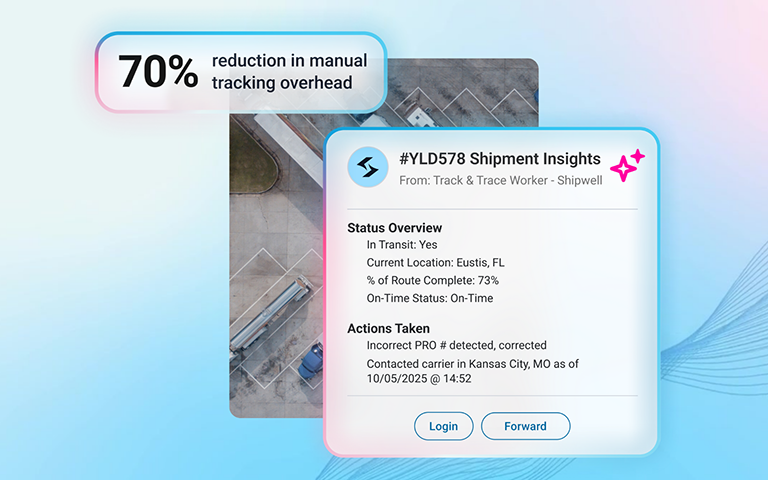
- The Track & Trace AI Worker cuts manual tracking work by up to 70%, running 24/7 and only acting when there's an actual gap to address.
- Now included: SMS outreach, company-branded email, smarter carrier communication, and full delivery validation make tracking records more accurate and carrier engagement more reliable.
- Configured entirely within AI Studio, it's the first in a growing ecosystem of autonomous workers built to free logistics teams from repetitive operational work.
Manual tracking work eats 70% of a logistics coordinator's shift. Here's how Shipwell's Track & Trace AI Worker gets that time back.
Ask a Logistics Coordinator about their daily routine, and the list looks the same everywhere:
- Check calls to carriers and drivers
- Hunting down missing or misrouted freight
- Pushing status updates to internal teams and customers
Essential work. Also constant, repetitive, and the reason coordinators struggle to focus on anything more strategic. Left to manual effort, these tasks create stress and make customer commitments harder to keep.
Your coordinators, and your customers, deserve better.
Why AI Changes the Track-and-Trace Math
Tracking gaps happen because there's too much to monitor and not enough time, not because teams don’t care. A carrier goes dark on a load; the driver hasn't confirmed pickup; the BOL number in the system doesn't match what the carrier has on file. Each issue is solvable -- but only if someone catches it in time.
Deploying an AI Worker shifts that equation entirely. Shipwell's Track & Trace AI Worker runs 24/7/365, watches every covered shipment, and only reaches out when there's actually a problem. What your team gets back:
- Up to 70% reduction in manual tracking overhead
- Near-instant visibility into shipment status
- Proactive stakeholder communication without lifting a finger
That opens the door for coordinators to do work that actually requires a human: exception triage, carrier performance conversations, customer relationships, and process improvements they’ve been too busy to tackle.
{{button}}
What the Track and Trace AI Worker Does
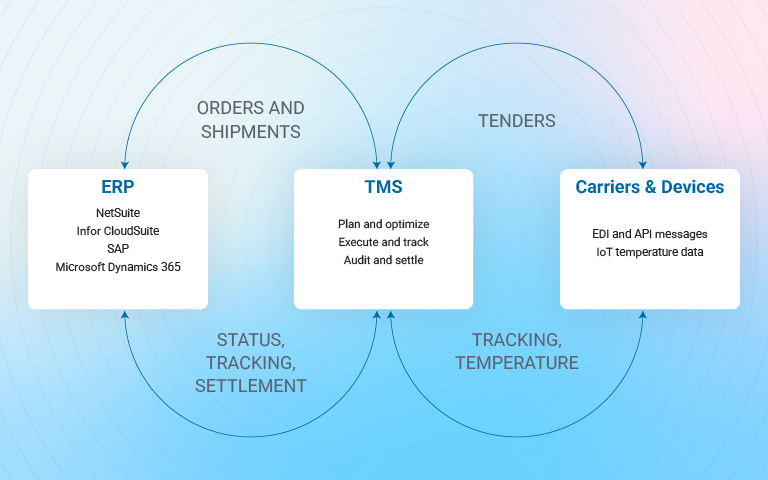
The worker is fully embedded in Shipwell's TMS. It doesn't see a subset of your operations, it sees all of it. From order creation and carrier assignment through final delivery and post-shipment analytics, the AI Worker has context on every touchpoint.
It handles the core tracking failure modes your team runs into every day:
- LTL tracking issues: Incorrect BOL numbers, wrong PRO numbers, mismatches between system data and what the carrier actually has -- the worker identifies and corrects these, or routes them for human approval depending on how you've configured it.
- Mobile app gaps: Driver hasn't downloaded the app, location tracking isn't enabled, pickup hasn't been confirmed -- the worker catches these before they become delivery problems.
- Missed pickups and stops: When a pickup window closes with no confirmation, the worker waits for your configured interval, then reaches out automatically.
- Full Container Load (Ocean) tracking: Covered. ELD tracking gaps are on the roadmap and in progress.
What’s New
The Track & Trace AI Worker has gotten significantly more capable since it first shipped. Here's what's been added.
SMS/Text Outreach
The worker can now reach carriers and drivers via SMS and RCS text message (not just email.) When email goes unanswered, text often gets through. Activity Log entries show which method was used, to which number, and when.
Your Company Email, Not Ours
Outreach now goes out from your company's Microsoft Outlook account (Gmail coming soon). Carriers see a message from your team, not a generic Shipwell address. That one change meaningfully improves response rates -- carriers engage faster when they recognize who's asking.
Smarter Carrier Communication
Tracking request emails and SMS messages now include personalized, shipment-specific examples. Instead of generic instructions, a carrier hauling from Aurora to Chicago scheduled for February 4th sees exactly that route and date pre-filled in the example. No guessing what format to use, no back-and-forth on what information is needed.
When carriers respond, they now get immediate confirmation: what was processed, which stops were updated, and what (if anything) is still needed. Incomplete responses trigger a clear, helpful follow-up.
Complete Delivery Validation
The worker now validates that all stops have been updated before marking a shipment delivered. If a carrier says it's delivered but stop data is incomplete, the worker requests the missing information, fills the gaps, and then closes the shipment. This eliminates incomplete records that used to slip through.
Out-of-order stop updates -- common when carrier status messages arrive non-sequentially -- are now handled without issue.
Full Activity Visibility
When carriers click the 'Enter Tracking Update' link and manually update shipment data, that engagement is now logged. Before this improvement, link clicks looked like non-responses even when the carrier had acted. Now operations teams see the complete picture: which outreach triggered a response, how long it took, and whether the update came through the link or manually.
Filtering in the Activity Log has also been tightened -- 'Failed' status now returns only failed rows. Each Activity Log row links directly to the Shipment Detail page for faster investigation.
AI Studio Overview Metrics
AI Studio now surfaces real-time metrics on what the worker is monitoring and resolving. Teams can see exception counts, resolution tracking, and outreach outcomes without digging through individual log entries.
What Can I Ask My Track and Trace Worker?
Here are just a few of the things you can ask our Track & Trace Worker to do. These are real interactions -- the kind your team would currently be making manually.
- Where is shipment #YLD579 right now?
Shipment #YLD578 is in transit just outside St. Louis, MO, on track for on-time delivery to your Dallas facility by 3:00 PM tomorrow.
- Any reported delays today?
All shipments are moving as scheduled. I'll alert you if anything changes.
- Update our customer with the latest ETA?
Done. I've sent the current ETA and a live tracking link. I can continue notifying them automatically as the status changes.
- Are any shipments at risk of missing their delivery window?
Shipment #54321 may be delayed due to heavy traffic near Chicago -- ETA is 45 minutes past the scheduled window. Want me to coordinate with the consignee?
- Did our refrigerated shipment stay in temperature range?
Yes, shipment #11223 maintained 34-38 degrees F throughout transit. Compliance report is in your documents section.
- Any weather delays on shipment #880275?
There's a 97% probability of snow near Omaha that will likely cause a delay. Want me to explore rerouting?
How to Set Up Your Track & Trace AI Worker
- Contact your Customer Success Manager. The Track & Trace AI Worker is an add-on product that needs to be activated first.
- Connect your company email. Navigate to AI Studio > Global Configuration > Email Integration to connect Microsoft Outlook.
- Configure the agent in AI Studio. Go to Manage > AI Studio and select Configure Agent. Key settings: worker name, AI model, agent user account, modes and carriers to monitor.
- Set your communication rules. Choose outreach levels (Light, Moderate, or Heavy), frequency limits, time windows, and carrier contact roles.
- Notify your carriers. Before activating, send a brief heads-up so your carrier network knows what to expect when automated requests arrive.
- Activate. Hit Activate Worker and monitor initial activity in the Activity Log.
Note: Contact your Customer Success Manager to get access. The AI Studio feature flag must be enabled for your account.
Built for What Comes Next
The Track & Trace AI Worker was the first autonomous worker in Shipwell's AI Studio – a centralized hub where teams configure, deploy, and monitor agents that handle the repetitive operational work of running freight. It's a deliberate starting point, not the finish line. An ecosystem of workers that can automate, optimize, and unify supply chain operations is already in progress.
The time your team saves on check calls and status chasing isn't just time back in their day. It's capacity for freight that actually moves.
Frequently Asked Questions
What modes does the Track & Trace AI Worker support?
FTL, LTL, Intermodal, Drayage, and Volume LTL. Full Container Load (Ocean) is also supported.
Can the worker update shipment data automatically?
"Allow Changes" lets it update automatically. "Verify First" sends you an approval request before any change. "Don't Change" sends a notification but leaves the edit to your team.
How do I know what the AI Worker is doing?
Every outreach and data change is logged in the Activity Log in AI Studio. You can filter by status, see the full resolution chain, and link directly to the shipment detail from each entry.
Does it work nights and weekends?
The worker runs 24/7/365. You configure which hours it initiates outreach, so it can monitor around the clock but only send messages during business hours if that's your preference.
Can I control which carriers it contacts?
Yes. Include or exclude specific carriers and modes. Selecting "Include All Carriers" ensures the worker automatically covers new carriers you add in the future.
How are my AI model choices handled?
You can select Anthropic Claude, OpenAI, or Google Gemini. Shipwell has opted out of data being used for model training by all three providers.
What happens if the AI Worker gives incorrect information?
The worker uses guardrails to ensure high-quality behavior. Errors are rare, and configuration options (including human-in-the-loop approval flows) let you set the level of oversight that fits your operation.