

.svg)


BETA
24/7 Shipment Monitoring Powered by AI
Logistics coordinators shouldn't be spending their day chasing shipment updates. Shipwell's Track & Trace AI Worker takes on the constant monitoring, exception detection, and communication—operating around the clock so your team can put their efforts elsewhere.
No more blind spots or continual follow-ups. Just reliable, real-time shipment tracking on autopilot.
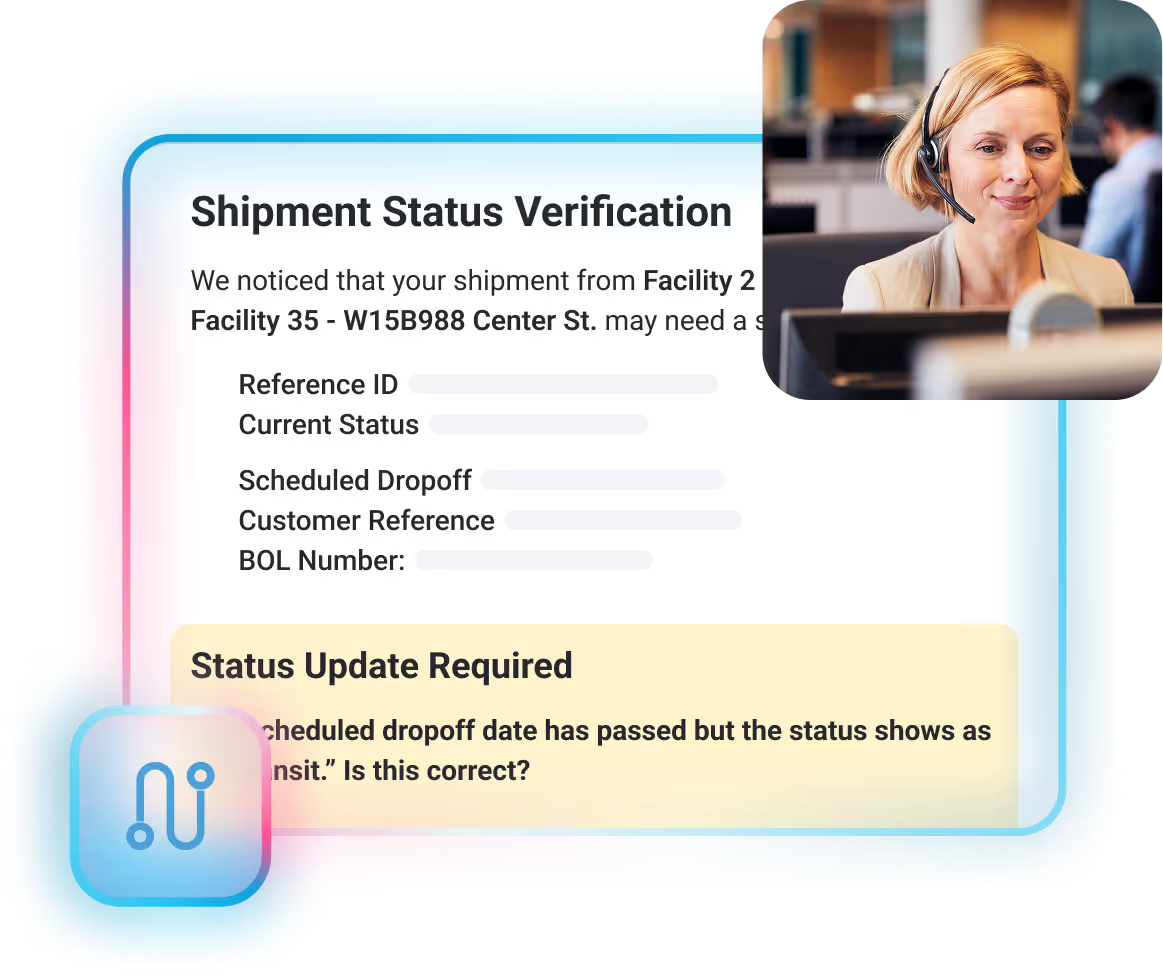

Meet Your Track and Trace AI Worker
Shipwell's Track & Trace AI Worker operates autonomously, like your most reliable coordinator. It monitors shipments in real-time (tracks) and looks back at its movement to detect issues (traces)– but better yet, takes action… all without breaks, vacations, or burnout. What the worker does:

Monitors shipments 24/7 across most modes of transport
Detects missing or delayed tracking in real-time
Automatically contacts carriers and drivers
Updates shipment data according to your configured rules
Escalates to your team only when needed
Configure it once through AI Studio, and the worker runs continuously, no daily management required.
Calculate Your Savings


The Hidden Cost of Manual Tracking
Track and trace is one of the most important–and most disruptive–logistics tasks. By doing it manually:
- Coordinators spend up to $25 per shipment in staff time, calls, and follow-ups
- Teams rarely get to focus on exception management and carrier performance analysis
- Tracking often gets deprioritized, leading to delays and unhappy customers
- Overnight shipment issues go unnoticed until morning
Manual processes can't keep up with the need for continuous visibility.
Download The Datasheet
How It Benefits Your Operations

70% greater tracking efficiency
Get time back for higher-value work like exception management & carrier relationship building.

Around the clock responses
Continuous shipment monitoring that acts immediately and never waits for business hours.

~90% reduction in email management
The worker takes care of all driver and carrier communication.

Improved customer satisfaction
Proactive updates & faster issue resolution keeps customers informed and happy.

Scale without adding headcount
Give your team the relief they need in minutes, not months with a new digital teammate.
Cost Savings of Automated Track and Trace
We ran the math and quantified impact against our current customers' cost savings. For a team managing 1,000 shipments per month, Shipwell's Track & Trace AI Worker can save you:
Configure Once. Run Forever.
Using AI Studio, you configure the worker to operate exactly as you would want your own team to work. You stay in control of every decision the worker makes, not locked into someone else's idea of how the best way tracking freight should work.
Download The DatasheetShipments to monitor
Select specific carriers or apply rules across your entire network
Communication preferences
Choose channels (email, SMS, Shipwell messages) and backup methods
Monitoring frequency
Set how often the worker checks for tracking updates
Outreach windows
Define when the worker contacts carriers: business hours only, after-hours, or 24/7
Data update rules
Automatically, requests approval first, or simply notifies your team–the choice is yours
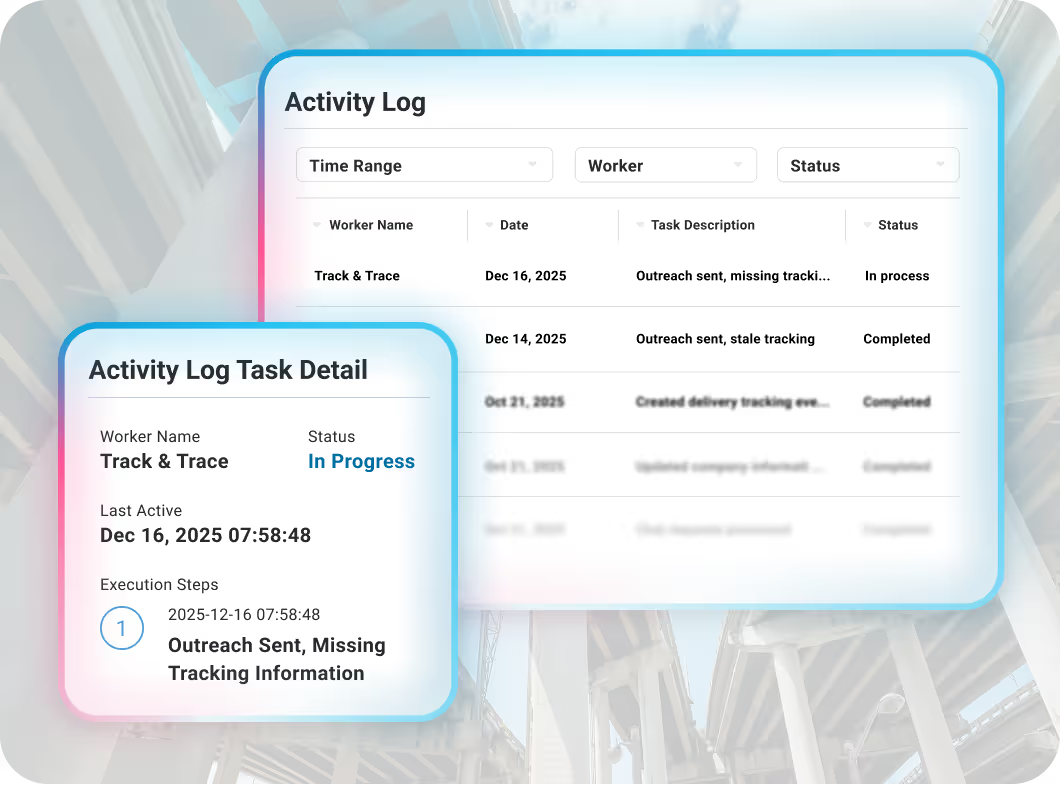
See Every Action the Worker Takes
The activity log in AI Studio records every outreach, data update, and decision the worker makes. You have complete transparency without being overwhelmed by routine monitoring that doesn't require action.
- Review what the worker communicated and when
- Audit data changes with full context
- Track approval requests and responses
- Export logs for compliance or process improvement
Every action is traceable. Nothing happens in a black box.
Enterprise-Grade Security & Data Protection
Your supply chain data is mission-critical. Unlike solutions that use your data to improve their models, Shipwell protects it with:
- SOC 2® Type II compliance with annual audits
- Your data never trains external AI models
- Complete audit trails of every worker action
- Secure data handling with enterprise-grade encryption
- User authentication tied to existing access management
We keep your competitive intelligence protected.
Tracking Challenges, Resolved
Shipwell’s Track & Trace AI Worker detects the issue, determines the cause, reaches out to the right party, and updates your system—all without pulling your team away from building better relationships with your customers.

Documentation Errors
... like incorrect BOL or PRO numbers that break carrier API connections.

Mobile Tracking Failures
... like when drivers haven't downloaded apps, disabled location services, or missed pickup confirmations.

Operational Exceptions
... including missed pickups, delayed stops, and delivery issues that need immediate carrier coordination.

Multi-modal Coverage
... across all shipping modes, giving you unified visibility regardless of transportation mode.
Stop Chasing Shipments. Let AI Handle the Track and Trace.
Shipwell’s Track & Trace AI Worker delivers continuous visibility, faster resolution, and real operational relief–without adding headcount or complexity.
Request a DemoExisting Shipwell customers can contact their Customer Success Manager to activate digital workers.
Frequently Asked Questions
What does the Track & Trace AI Worker do?

The worker continuously monitors your shipments, identifies missing or delayed tracking, and automatically communicates with carriers or drivers to resolve issues. It handles the research, follow-ups, and updates your coordinators would normally do—freeing them to focus on exceptions, carrier performance, and customer relationships.
Does the worker replace my transportation team?
No. The worker handles repetitive track and trace tasks, not strategic decision-making. It eliminates the constant follow-ups and data hunting so your coordinators can focus on work that requires human judgment—like managing complex exceptions, negotiating with carriers, and building customer relationships.
How does the worker know when to take action?
You configure the worker's behavior in AI Studio. You define which shipments to monitor, how often to check tracking, when issues should trigger outreach, and whether the worker updates data automatically or requests approval first. The worker follows your rules consistently.
What happens when the worker finds incorrect shipment data?
You decide how the worker responds. Options include:
- Automatically updating the data
- Requesting your approval before making changes
- Notifying your team without changing anything
All configurations are set in AI Studio based on your preferences.
Can I see what the worker is doing?
Yes, Shipwell’s AI Studio lets you configure worker behavior, communication preferences, branding, and permissions to fit your business needs.Yes. Every outreach and data change is recorded in the activity log within AI Studio. You have complete visibility into the worker's actions without being overwhelmed by routine monitoring that doesn't require action for the best way tracking freight.
How does the worker communicate with carriers and drivers?
The worker can communicate through email (company email or Shipwell email), Shipwell shipment messages, and SMS/RCS. You configure the primary and backup communication methods in AI Studio. When carriers or drivers respond, Shipwell updates automatically—just like EDI or ELD tracking.
Does the worker operate outside business hours?
Yes, the worker monitors shipments 24/7/365. However, you control when it communicates with external parties by setting approved outreach windows in AI Studio. You might configure it to only contact carriers during business hours while still monitoring around the clock.
What types of tracking issues can the worker resolve today?
The worker addresses the most common tracking gaps.
API Issues:
- Incorrect BOL or PRO numbers
- Documentation mismatches
- Carrier website tracking failures
Mobile App Tracking Issues:
- App not downloaded
- Location tracking not enabled
- Missed pickup confirmations
- Manual tracking with no updates
Operational Exceptions:
- Missed pickups, stops, and deliveries
- Multi-mode coverage
Will the worker send incorrect information to my carriers?
The worker uses generative AI combined with rule-based guardrails to ensure high-quality behavior. While no AI system is perfect, incorrect actions are rare. You can configure approval workflows for sensitive actions, and every communication is logged in the activity log for review.
How is my data protected?
Shipwell is SOC 2® compliant with role-based access controls, secure data handling, and full audit trails. This worker uses Anthropic's Claude model, and Shipwell has opted out of data usage for AI model training. Your supply chain data remains protected and under your control.
Is the Track & Trace AI Worker included with my Shipwell subscription?
The worker is available as an add-on for existing Shipwell customers. Contact your Customer Success Manager to discuss setup, configuration, and pricing.
How long does it take to deploy the worker?
Shipwell’s Track & Trace AI Worker is available exclusively as an add-on for current customers. Once configured through AI Studio, it takes just minutes once you've defined your monitoring rules, communication preferences, and approval workflows.
Can the worker handle multiple carriers and modes simultaneously?
Yes. The worker monitors across all carriers and modes with unified configuration. You can apply rules across your entire network or select specific carriers to monitor.
What happens if multiple people on my team respond to an approval request?
The worker uses the first valid response received. Additional responses are ignored to prevent conflicting instructions.
How do I get started?
Contact your Shipwell Customer Success Manager to enable the Track & Trace AI Worker. They'll guide you through the initial configuration in AI Studio and help you set monitoring rules, communication preferences, and approval workflows.
